
Download termBlaster Extension – search engine, online resources, Firefox extension, context menu, web search, information retrieval, research tool, productivity tool
Overview
The termBlaster Extension is a productivity-focused tool designed for users of Mozilla Firefox, aiming to enhance the efficiency of online information retrieval. By integrating directly into the browser’s context menu, it provides immediate access to a wide range of web-based resources with a single right-click. This functionality is particularly useful for individuals who conduct frequent research, need rapid access to definitions, or rely on multiple search engines during their daily tasks. The extension serves as a centralized hub for web searches, reducing the need to navigate between multiple websites or manually type URLs.
Target users include students, researchers, content creators, and professionals who require fast and structured access to online tools. The extension helps streamline workflows by minimizing the time spent switching between tabs or searching for relevant websites. Its long-standing presence in the Firefox ecosystem since 2007 indicates consistent relevance and user trust. Although the developer, termBlaster, has not provided detailed background information, the extension’s enduring functionality suggests a focus on reliability and simplicity.
Real-world use cases include quickly checking definitions via online dictionaries, searching for data on Wikipedia, or comparing results across Google and Yahoo without leaving the current page. In the broader context of browser extensions, termBlaster occupies a niche as a lightweight, no-frills utility that enhances core browsing behavior. Its purpose remains clear: to make web searches faster and more organized.
Key Features & Functionality
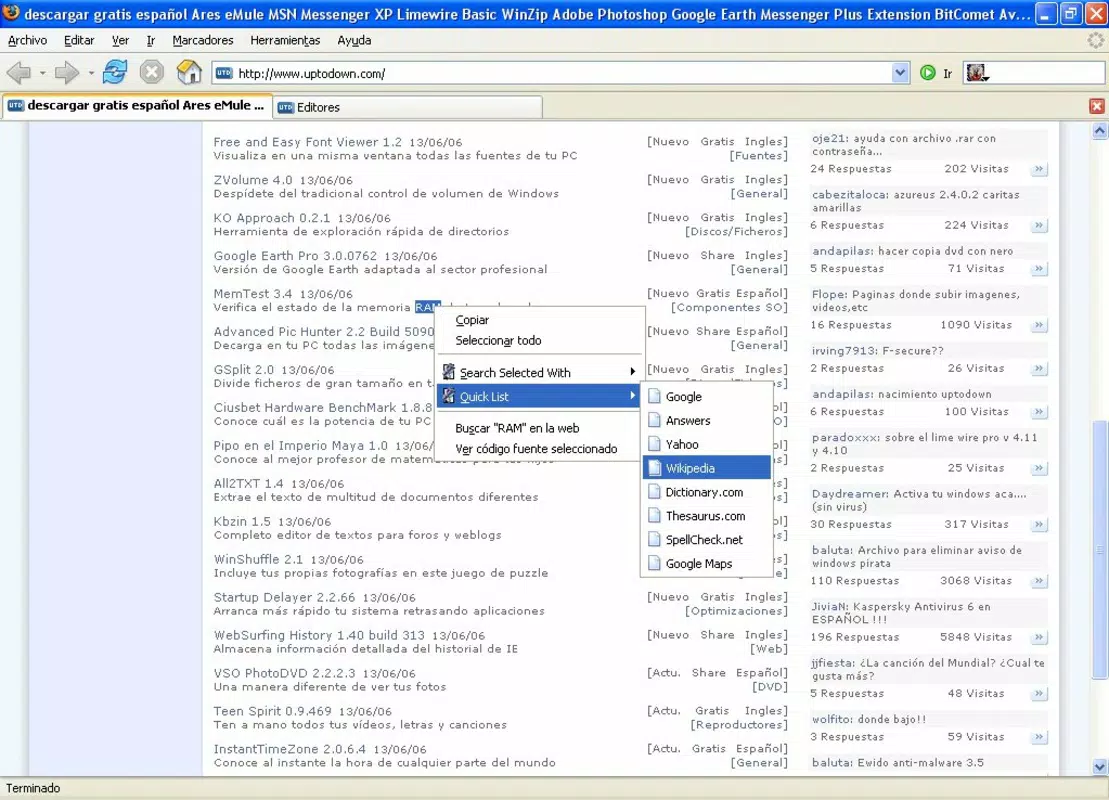
- Structured Context Menu: The extension adds a well-organized menu to the right-click context menu, categorizing resources into logical groups such as search engines, dictionaries, and translators. This layout allows users to quickly locate relevant tools without scrolling through unrelated options.
- Quick Search Tool: With one right-click on any selected text, users can initiate searches across major engines like Google, Yahoo, and Wikipedia. This feature eliminates the need to copy text, open a new tab, and paste it into a search bar.
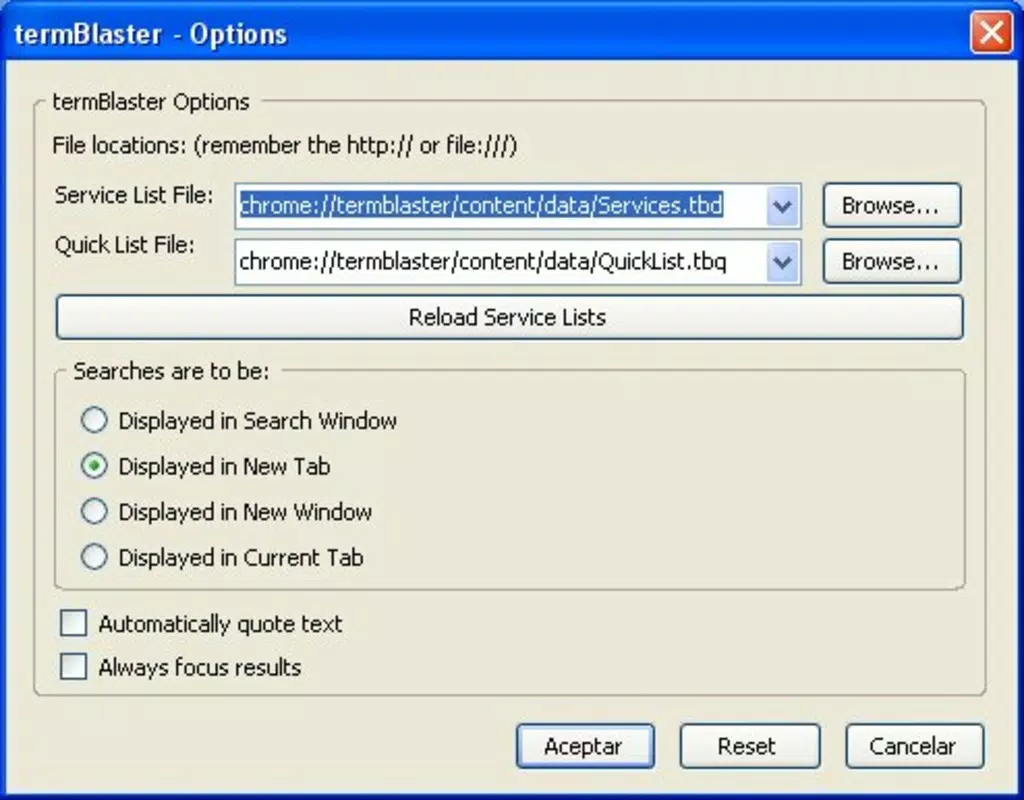
- Flexible Results Display: Users can configure how search results appear—opening in a new tab, new window, or the current tab. This customization supports different browsing habits and enhances workflow continuity.
- Access to Diverse Online Resources: Beyond search engines, the extension links to dictionaries, directories, and translation services, offering a one-stop solution for information gathering and language support.
- Seamless Firefox Integration: Built specifically for Mozilla Firefox, the extension operates without disrupting the browser’s native interface. It requires no additional setup or configuration, making it accessible to users of all technical levels.
For example, a student researching a historical event can right-click on a term, select Wikipedia from the menu, and instantly view the article in a new tab. A writer needing a synonym can quickly access a dictionary without leaving their document. These real-world applications demonstrate the practical value of the extension’s design.
Interface, UX & Performance
The user interface of the termBlaster Extension is minimal and context-driven, relying entirely on the Firefox context menu. This design choice ensures that the extension remains unobtrusive while delivering powerful functionality. The visual style matches Firefox’s native appearance, maintaining consistency with the browser’s overall aesthetic. Navigation is intuitive: users select text, right-click, and choose their desired resource from the menu.
Although the developer did not list formal performance metrics, the extension’s lightweight file size of 1.1 MB suggests it has a low impact on browser performance. It does not appear to consume significant memory or processing power during operation. Responsiveness is expected to be high, given its direct integration with the browser’s core functions. Stability is supported by its long-term availability since 2007, indicating that it has undergone consistent maintenance and bug fixes over time.
Compatibility with different device categories is not explicitly detailed. However, as a Firefox extension, it is likely to function across desktop systems with varying hardware configurations. Users may experience slight delays on older systems, but no performance issues have been reported in available documentation.
Platform Compatibility & Technical Requirements
The termBlaster Extension is designed exclusively for Mozilla Firefox, ensuring compatibility with the browser’s architecture and extension ecosystem. The current version is 1.0.2, released on April 20, 2007. The file size is 1.1 MB, indicating a lightweight installation that does not significantly affect system storage.
The developer did not specify minimum OS requirements or compatibility details beyond the platform. As such, users should ensure their Firefox version is up to date to maintain full functionality. Compatibility with modern Firefox releases is assumed, given the extension’s longevity, but no official confirmation has been provided.
Users are advised to verify their browser’s extension compatibility settings before installing. The extension is available at no cost, making it accessible to a wide audience seeking efficient web search tools.
Pros and Cons
- Lightweight design with minimal system impact
- Efficient right-click access to multiple online resources
- Supports flexible result display options
- Seamless integration with Mozilla Firefox
- Free to download and use
- Version and compatibility details are outdated
- No official update history or changelog provided
- Limited to Firefox browser only
- Interface lacks customization beyond default settings
- Developer information is not publicly available
FAQ
Is the termBlaster Extension safe to install?
Yes, the extension is free and available through official Firefox channels. It does not require elevated permissions and operates within the browser’s sandboxed environment.
Can I use termBlaster on mobile browsers?
The extension is designed specifically for Mozilla Firefox on desktop platforms. It is not compatible with mobile browsers or Firefox for Android.
How do I update the termBlaster Extension?
Updates are automatically managed by Firefox when available. Users should ensure their browser is updated to the latest version to receive the most recent extension updates.
Does termBlaster collect user data?
The developer did not disclose data collection practices. As a context menu extension, it does not appear to track browsing behavior or store personal information.
Is termBlaster available for other browsers?
Currently, the extension is only available for Mozilla Firefox. There is no official version for Chrome, Safari, or Edge.
Final Thoughts
The termBlaster Extension remains a reliable and efficient tool for anyone seeking to streamline their web search experience within Mozilla Firefox. Its ability to deliver instant access to search engines, dictionaries, and translation services through a single right-click makes it a valuable asset for students, researchers, and professionals. While its interface and feature set are basic, the extension excels in simplicity and performance.
Despite its age and lack of recent updates, the extension continues to function without known issues, reflecting its stable core design. For users who prioritize speed, ease of use, and integration with Firefox, termBlaster offers a practical solution without complexity or cost.
Download termBlaster Extension now


